
Accessibility

ATM accessibility: designed for everyone

Good ATM accessibility means cash machines are built so that people who are blind, partially sighted, wheelchair users or have other disabilities can get their money independently and privately. Here's how.

Why does the 5 have a raised dot?

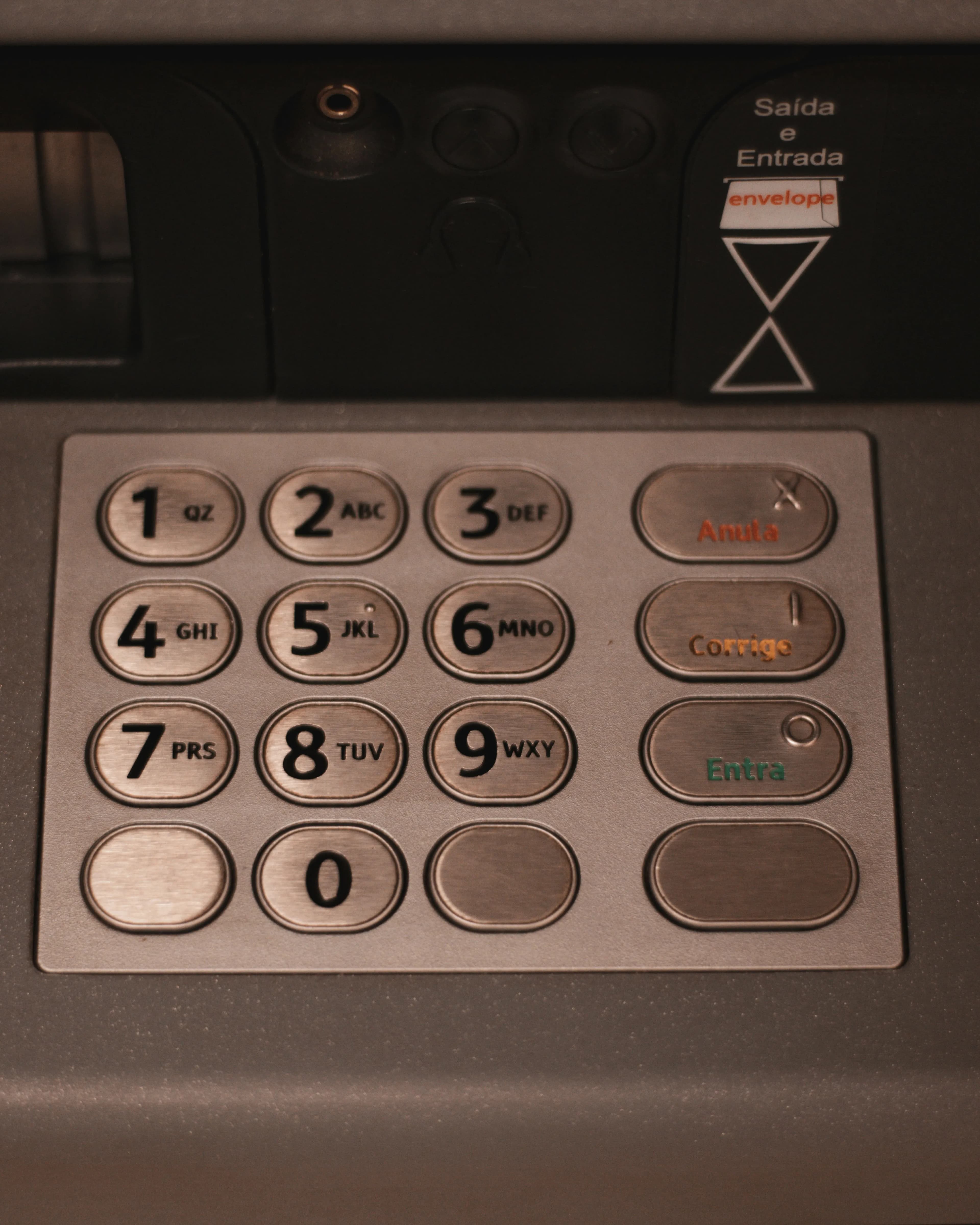
Run your finger over an ATM keypad and you'll feel a small raised dot on the number 5. It isn't a manufacturing mark. It's there so people who can't see the keys can find their way around by touch.

The 5 sits in the very centre of the keypad. Once you've found it, every other number is one step away: 2 is directly above, 8 directly below, 4 to the left and 6 to the right. The corners are 1, 3, 7 and 9, and 0 sits alone on the bottom row.

ATMs use the same layout as a telephone, with 1-2-3 across the top, unlike a calculator, which puts 7-8-9 at the top. Most phones have the same raised dot on the 5, so if you can dial a phone by touch you can use a cash machine too.

Close-up of a metal ATM keypad showing the numbers 1 to 9 and 0 in a telephone layout
The 5 key is the anchor point. Find it first and the rest of the keypad follows.

Cancel, Clear and Enter: shapes you can feel

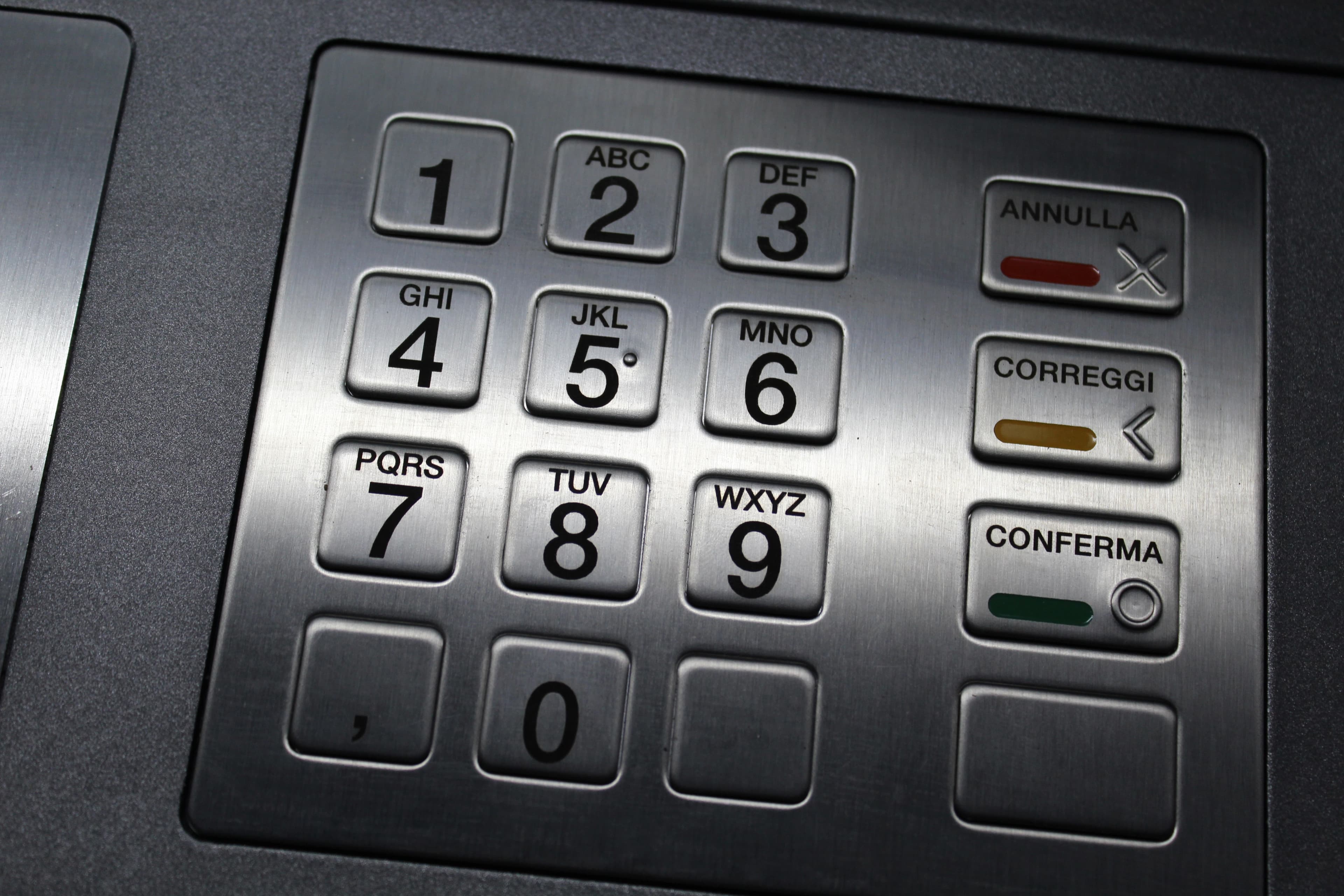
The three function keys beside the numbers each carry a raised symbol as well as a colour. The symbols mean the same thing on any machine in any country, so you can use an ATM by touch even when you can't read the language on the buttons.

  • Cancel

    Red · A raised X

    Stops the transaction straight away and returns your card. Use it if you change your mind or something doesn't feel right.

  • Clear

    Yellow · A raised left arrow (<)

    Rubs out what you've just typed, like a backspace, so you can re-enter your PIN or amount without starting again.

  • Enter

    Green · A raised circle (O)

    Confirms your PIN, amount or choice and moves you on to the next step.

An Italian ATM keypad with keys labelled Annulla, Correggi and Conferma, marked with a red X, a yellow left arrow and a green circle, and a raised dot on the 5
This keypad is in Italian (Annulla, Correggi, Conferma), but the red X, yellow arrow, green circle and the dot on the 5 work the same as anywhere else.

Talking ATMs and headphone sockets

A talking ATM reads out everything on the screen through a pair of headphones, guiding you step by step through your transaction. There are around 10,000 talking cash machines in the UK, and Barclays was the first bank to install them.

More ways ATMs help

Accessibility goes beyond the keypad. These features make cash machines easier for people with low vision, limited mobility and other needs.

  • Large text and high contrast

    Some newer machines offer a large-text or high-contrast mode for people with low vision, with bigger buttons and stronger colours that are easier to read.

  • Wheelchair-friendly height

    Accessible ATMs place the screen, keypad and card slot within easy reach from a seated position, with clear space to pull up alongside or in front. In the US, the law requires controls to be between 15 and 48 inches (about 38–122 cm) from the floor.

  • Anti-glare, angled screens

    Screens tilted back and treated against glare are easier to read from a wheelchair, in bright sunlight or for people with light sensitivity.

  • Contactless cards

    On machines with a contactless reader you simply tap your card instead of finding and lining up the card slot. That helps people with limited sight or dexterity.

  • Braille instructions

    Many machines have braille instructions explaining how to start the audio mode (US rules require them), so blind users know the feature is there.

  • Extra time

    If you take a while to respond, most machines ask whether you need more time before it cancels, rather than ending the session straight away.

  • Simple, clear menus

    Plain language, “fast cash” buttons and a choice of languages help people with cognitive or learning disabilities, and anyone who isn't a native speaker.

  • Touch-friendly bank cards

    Mastercard's Touch Card has a notch cut into the edge so you can tell cards apart by feel: round for credit, squarish for debit and triangular for prepaid. It was developed with the RNIB.

What the research says: barriers that remain

Accessibility features only help if they're actually there and work in practice. Studies with disabled bank customers show where cash machines still fall short.

Survey · Indonesia · 2021

Blind and partially sighted customers

Researchers surveyed 45 visually impaired bank customers who already used ATMs on their own, then held focus groups to understand their experiences.[1]

The hardest parts were:

  • Reading information and instructions on the screen
  • Entering a PIN on keypads without tactile markers or braille
  • Using touchscreen ATMs, especially those without audio
  • Getting help when something went wrong and no staff were nearby

Other problems came before reaching the machine: stairs up to ATM rooms, not knowing whose turn it was in a queue, and printed receipts with no braille. The authors note that a keypad with raised markers isn't enough on its own. If the screen can't be heard, the ATM is still inaccessible.[1]

Case study · India · 2012

Wheelchair users

Physiotherapists assessed an ATM in Kolkata from the point of view of a wheelchair user, checking it against published accessibility guidelines.[2]

Some guidelines were met, but problems included:

  • A ramp that was too steep
  • The height of the ATM itself
  • No flat, level space near the entrance
  • Not enough leg clearance to pull up close to the machine

It's a reminder that accessibility is about the whole journey: the route to the machine matters as much as the machine itself.

Looking ahead: new ideas being tested

Researchers are exploring technology that could make ATMs easier for everyone to use.

Prototype · UK · 2013

A keypad that guides your hand

A team from UK universities built a haptic keypad that gives silent prompts you can feel. It uses a “clock face” idea to point you towards the part of the machine you need next, such as the card slot or cash dispenser.[3]

In testing, people with different levels of sight loss could detect, tell apart and act on the prompts. That offers an alternative to audio for anyone who can't, or would rather not, use headphones.[3]

System design · Malaysia · 2016

Fingerprints instead of cards

Engineers designed a cardless ATM that identifies you by fingerprint, protected with 128-bit AES encryption. Their main aim was security: no card to clone, skim, damage or lose.[4]

It could help accessibility too. Inserting a card and entering a PIN are among the steps visually impaired users find hard, and researchers have suggested biometrics as an alternative to the PIN, as long as privacy is protected.[1]

Tips for using an accessible ATM

  1. Keep a pair of wired headphones (or a 3.5 mm adapter) in your bag or pocket.
  2. Use the LINK cash machine locator to find talking ATMs near you.
  3. Indoor ATMs inside banks and supermarkets are often quieter, better lit and easier to reach.
  4. Feel for the raised dot on the 5 first, then find every other key from there.
  5. Ask your bank about accessible cards, large-print statements or other support. Banks must make reasonable adjustments for disabled customers.

References

  1. Subekti, P., Hafiar, H. & Setianti, Y. (2021). Technology of Auto Teller Machine Interface: Accessibility for Bank Customer with Visual Impairments. Journal of Physics: Conference Series, 1783, 012024.
  2. Kumar, A., Sharad, K. S. & Anwer, S. (2012). Difficulties faced by the wheel chair users in accessing automated teller machine (ATM): a case study. Indian Journal of Physiotherapy and Occupational Therapy, 6(1), 142–144.
  3. Cassidy, B., Cockton, G. & Coventry, L. (2013). A haptic ATM interface to assist visually impaired users. Proceedings of the 15th International ACM SIGACCESS Conference on Computers and Accessibility (ASSETS ’13).
  4. Ahmad, N., Rifen, A. A. M. & Wahab, M. H. A. (2016). AES Cardless Automatic Teller Machine (ATM) Biometric Security System Design Using FPGA Implementation. IOP Conference Series: Materials Science and Engineering, 160, 012113.

Further reading